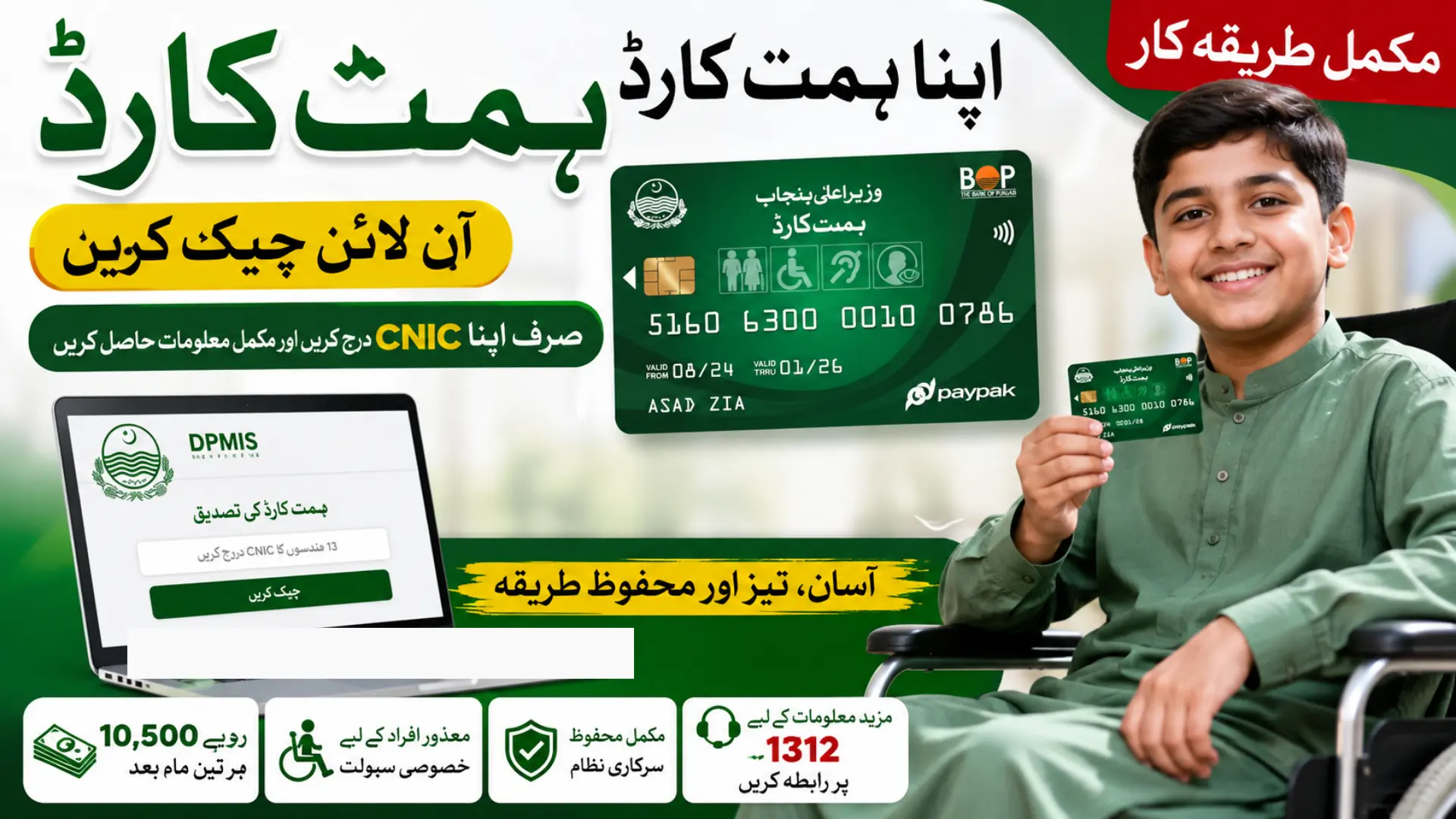
Himmat Card Verification via DPMIS Portal allows eligible Persons with Disabilities (PWDs) in Punjab to check their Himmat Card information online using their own 13-digit CNIC. This guide explains the complete DPMIS verification process, including how to open the official verification page, enter the PWD CNIC, submit the request, and understand the available information.
It also covers Himmat Card eligibility requirements, the Rs. 10,500 quarterly stipend, CNIC validation errors, updated DPMIS information, and expired CNIC payment issues. If your CNIC has expired, you can learn the official NADRA renewal, Bank of Punjab biometric verification, and follow-up process required for payment processing.
Quick Answer
| Detail | Information |
|---|---|
| Verification Portal | dpmis.punjab.gov.pk |
| What You Need | 13-digit CNIC of the PWD (not the guardian) |
| Cost to Check | Free |
| Program Managed By | Social Welfare and Bait-ul-Mal Department, Punjab |
| Stipend Amount | Rs. 10,500 every three months |
| Official Helpline | 1312 |
| Offline Option | District Social Welfare Office |
Note: This guide explains the process for informational purposes. Always complete your actual verification on the official portal at dpmis.punjab.gov.pk.
What Is Himmat Card Verification via DPMIS Portal?
Himmat Card verification is the process of checking a PWD’s record through the Punjab Social Welfare & Bait-ul-Maal Department’s DPMIS system.
The official DPMIS verification page provides a Check Himmat Card Status form. It asks the applicant to enter a 13-digit CNIC belonging to the PWD. The official page also contains a notice about expired CNICs and payment-disbursement errors.
The Himmat Card program is a Punjab Government initiative for eligible Persons with Disabilities. The Social Welfare Department currently states that eligible beneficiaries receive Rs. 10,500 per quarter.
Who Can Check Himmat Card Status?
A PWD can check the Himmat Card record through the DPMIS verification page using the person’s own CNIC.
The official DPMIS page states that:
- The CNIC must contain exactly 13 digits.
- The CNIC must belong to the Person with Disability.
- A guardian’s CNIC should not be used for this verification.
This distinction is important because entering a guardian’s CNIC can produce a validation problem.
What Do You Need for Himmat Card Verification?
Before checking your status, keep the following information ready:
- The PWD’s original CNIC number.
- The complete 13-digit CNIC without missing digits.
- An active internet connection if you are using the online portal.
For the public Himmat Card verification form, the official DPMIS page does not require you to enter a password before checking the status. The main requirement shown on the verification page is the PWD’s CNIC.
How to Check Himmat Card Verification via DPMIS Portal
Follow these steps to check your Himmat Card status online.
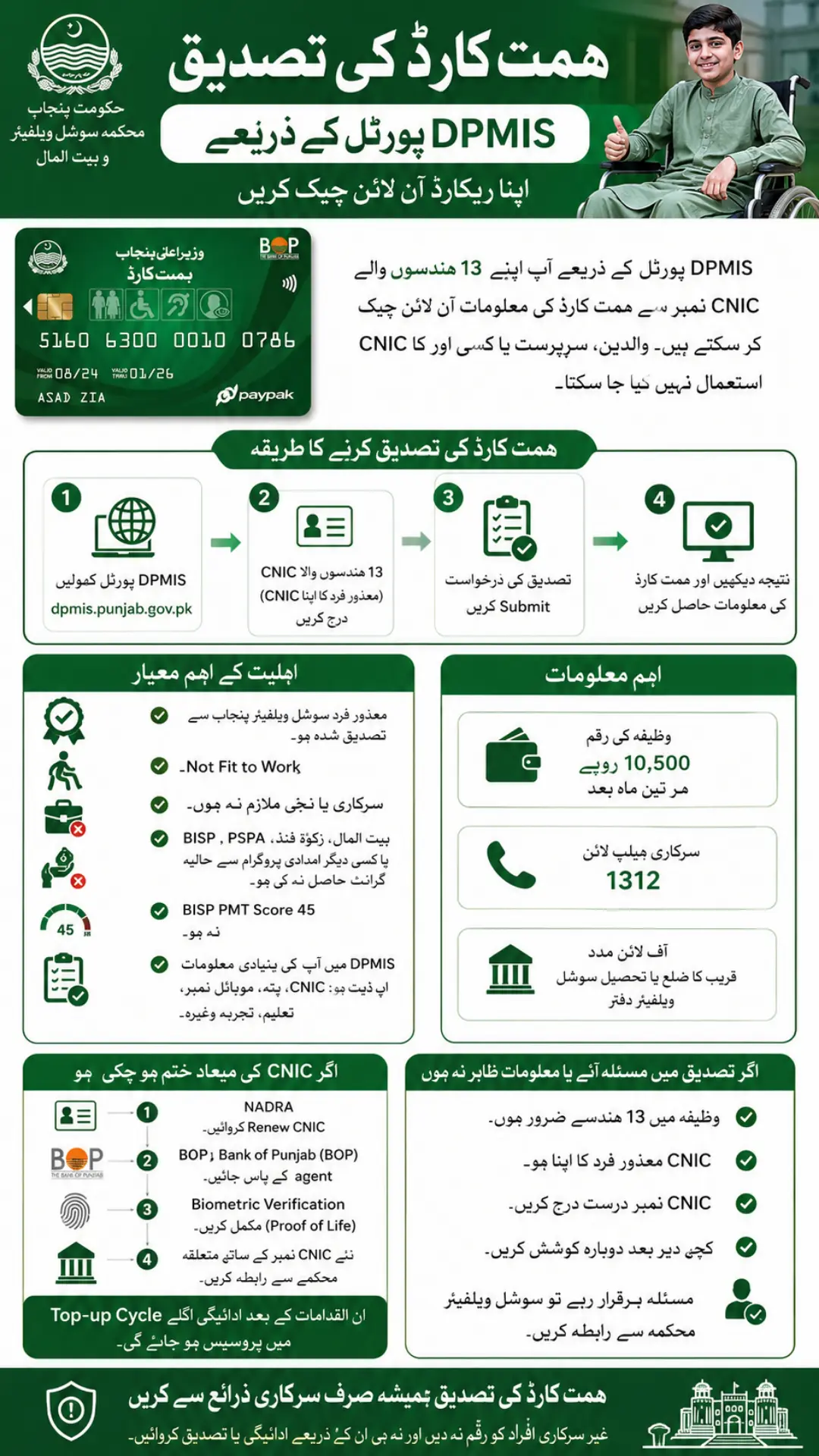
Step 1: Open the Official DPMIS Himmat Card Verification Page
- First, open the official DPMIS Himmat Card Verification page provided by the Punjab Social Welfare & Bait-ul-Maal Department.
Step 2: Enter the PWD CNIC
- Enter the CNIC number of the Person with Disability in the verification field.
- The official portal requires a 13-digit CNIC. Enter the number carefully and use the PWD’s CNIC rather than the CNIC of a parent, guardian, or another family member.
Step 3: Submit the Verification Request
- After entering the CNIC, submit the form.
- The DPMIS system uses the entered PWD CNIC to check the relevant Himmat Card record.
Step 4: Check the Result
- After submission, review the information displayed by the portal.
If the record is available, the result can help you determine the current status of the Himmat Card record. If the portal does not accept the CNIC, first check whether the number contains exactly 13 digits and belongs to the PWD.
What If Himmat Card Status Is Not Showing?
If your Himmat Card status does not appear, do not immediately assume that your application has been rejected.
First, check the following:
- Make sure the CNIC has exactly 13 digits.
- Make sure you entered the PWD’s CNIC.
- Check that the CNIC information is correct.
- Try the verification page again if there is a temporary portal issue.
- If the problem continues, contact the Social Welfare Department for assistance.
The official Himmat Card FAQ says that applicants can check their status online through the DPMIS Himmat Card verification page or contact the Social Welfare Office.
Himmat Card CNIC Validation Error
The official DPMIS verification page specifically identifies a CNIC Validation Error.
According to the official instruction, the CNIC entered must:
- Be exactly 13 digits.
- Belong to a Person with Disability.
- Not be the CNIC of a guardian.
Therefore, if the system rejects the CNIC, verify these points before trying again.
What to Do If Your CNIC Has Expired?
An expired CNIC can cause problems with Himmat Card payment disbursement. The official DPMIS Himmat Card verification page contains an Expired CNIC Issue notice explaining that some payments could not be disbursed because of expired CNICs.
The official resolution steps are:
- Renew the CNIC through NADRA.
- Visit the nearest Bank of Punjab (BOP) agent.
- Complete biometric verification, also described as Proof of Life.
- Contact the relevant department with the renewed CNIC number.
According to the official DPMIS notice, after these steps the payment can be processed in the next top-up cycle.
Himmat Card Eligibility Criteria
Verification should not be confused with eligibility. Checking a CNIC tells you about the record in the DPMIS system, while eligibility depends on the program’s official criteria.
The Social Welfare Department lists these main conditions:
- The PWD must be certified by Social Welfare Punjab.
- The PWD must be assessed as Not Fit to Work.
- The PWD must not be employed in a government or private office.
- The PWD must not have recently received a grant from Bait-ul-Maal, Zakat Fund, PSPA, BISP, or similar listed assistance.
- The PWD’s BISP PMT score must not exceed 45.
- The PWD’s basic information in DPMIS should be updated, including CNIC, address, mobile number, education, and experience where applicable.
How Much Does Himmat Card Pay?
The Punjab Social Welfare Department currently states that the Himmat Card provides a quarterly stipend of Rs. 10,500 to eligible PWDs.
The Punjab Government’s Himmat Card program page also lists Rs. 10,500 as the quarterly stipend and states that the program is being distributed in batches.
Is Himmat Card Registration Completely Online?
DPMIS provides online registration and verification services for PWDs. The official Social Welfare Department also states that PWD registration can be completed online through DPMIS.
However, eligibility and disability certification involve government verification requirements. Therefore, users should not assume that simply submitting an online form automatically guarantees approval or payment.
What If Your Information Is Incorrect?
The official Himmat Card FAQ states that if a CNIC is shortlisted but the data is not updated, the applicant should update the information through the DPMIS portal or visit the Social Welfare Office.
Keeping your CNIC, address, mobile number, and other basic PWD information up to date is therefore important.
What If You Have a Problem With Himmat Card Verification?
If you cannot verify your record online, you can contact the Social Welfare Department for assistance.
The official Himmat Card FAQ provides helpline 1312 and advises applicants to contact the Social Welfare & Bait-ul-Maal district or tehsil camp office when they need help with Himmat Card issues.
You should keep your original CNIC and relevant registration information available when asking for assistance.
Himmat Card Verification via DPMIS Portal – Quick Summary
The basic verification process is:
- Open the official DPMIS Himmat Card verification page.
- Enter the PWD’s 13-digit CNIC.
- Submit the verification request.
- Review the available status or eligibility information.
- If there is a CNIC error, verify the 13-digit number and make sure it belongs to the PWD.
- If the CNIC is expired, renew it through NADRA and complete the official biometric and follow-up steps.
- Contact the Social Welfare Department or helpline 1312 if the issue remains unresolved.
Frequently Asked Questions
How Can I Check My Himmat Card CNIC Check Online?
You can check it through the official DPMIS Himmat Card verification page by entering the PWD’s 13-digit CNIC.
Can I use my guardian’s CNIC for Himmat Card verification?
No. The official DPMIS verification page says the CNIC must belong to the Person with Disability, not the guardian.
What should I do if my CNIC gives a validation error?
Check that the CNIC contains exactly 13 digits and belongs to the PWD. If the problem continues, contact the Social Welfare Department.
What happens if my CNIC has expired?
Renew the CNIC through NADRA, complete biometric verification at a Bank of Punjab agent, and contact the relevant department with the renewed CNIC number.
How much is the Himmat Card stipend?
The current official Social Welfare Department information states that eligible beneficiaries receive Rs. 10,500 every quarter.
What is the Himmat Card helpline?
The official Himmat Card FAQ lists 1312 as the helpline for Himmat Card issues.
Final Words
Himmat Card Verification via DPMIS Portal is useful for Persons with Disabilities who want to check their Himmat Card record using the official Punjab government system. The key point is to enter the PWD’s own 13-digit CNIC, because the official verification page does not accept a guardian’s CNIC for this check.
If your CNIC is expired, renew it and complete the required biometric and follow-up process. If your record still cannot be verified, contact the Social Welfare Department through the official support channels instead of paying an unofficial person to check or release a payment.
1 thought on “Himmat Card Verification via DPMIS Portal – Complete Details 2026”